NCEdCloud IAM Service
Service Description
The NCEdCloud Identity and Access Management (IAM) Service provides every K-12 student, teacher, and staff member in North Carolina with an account. This single credential enables access to cloud-based learning resources.

Account and Access Control Management Efforts
Security Domain
CIS Control 5 – Account Management, Control 6 – Access Control Management
NIST CSF – Protect: Identity Management, Authorization, and Access Control (PR.AA)
NIST 800-53 – Access Control
- SSO with MFA into state applications
- Same credentials for both state and local systems
- Automated provisioning and de-provisioning (Identity Lifecycle Management)
Announcements
MFA Enhancement: WebAuthN Passkey Support
NCEdCloud now supports WebAuthN as an alternative to TOTP codes for multi-factor authentication! While TOTP remains the default, individual users or administrators can enable WebAuthN instead. WebAuthN supports passkeys, including Yubikeys, Apple TouchID / FaceID, and Windows Hello.
Multi-Factor Authentication FAQs
A new overview video and FAQ document intended for PSU Administrators is now available! This covers the upcoming statewide MFA requirement and the options available for administrators to roll out MFA early.
Employee MFA Self Opt-In
A new Request Workflow is now available for all PSU Employees statewide: Enforce MFA (Single User). When an employee submits this request, the “Enforce MFA” checkbox is checked on their account, and MFA is required the next time they sign in. A PSU Administrator can uncheck this box for them if necessary prior to the statewide enablement on July 1st, 2026.
New Workflow for Administrator Feature Requests
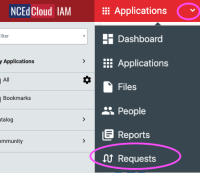
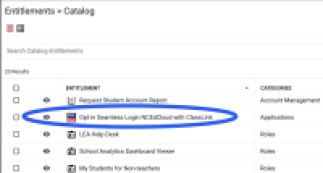
Requests for Target Application integrations, Amplify Icons for 5th and/or 6th grade students, Studio Rostering, Classlink Seamless login, and opting out of student badges are no longer submitted through web forms on this site. These have been migrated to workflow requests in the NCEdCloud RapidIdentity Portal. Staff with the LEA Administrator role will be able to access these workflows under the “Requests” view (via the dropdown at the top of the portal), and by selecting the required workflow from the list in the “Catalog”.
Regenerate Default Passwords for Students
If you regularly reset/change passwords for your students prior to the start of a new school year, please remember this new feature that allows the regeneration of the student’s DEFAULT Password. This can be done for: the entire PSU, by school, by grade, or by grade within a school. More information can be found in the Regenerate Default Passwords for Students document.
“Ask the Experts” Webinars
Identity Automation and NCDPI are offering quarterly webinars to answer questions from LEA Administrators about the NCEdCloud IAM Service. Register via your invitation from Identity Automation, or check the “Ask the Experts” section of the PSU Administrators page.
PSU Time Commitment
Upfront/Setup: Varies based on PSU, but all PSUs are enrolled automatically
Ongoing: Varies based on the unique PSU environment
How to get this service
All PSUs have this service by default.
Point of Contact
End users should contact their local IT team for assistance.

Frequently Asked Questions
General FAQs, including those dealing with Passwords can be found on our documentation site.